
Add an Asset
- From the side menu select Assets & Areas → Assets
- Select + Add New Asset
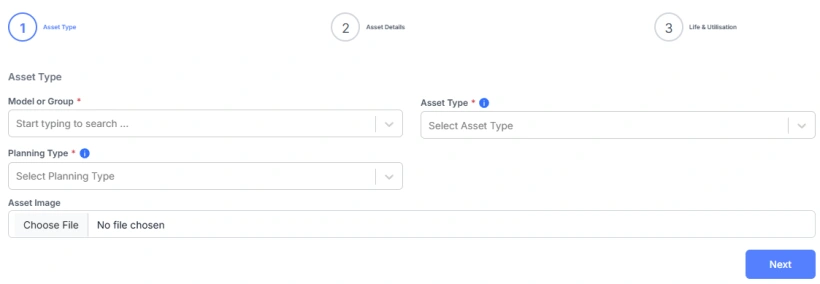
- Select the Asset Type and Planning Type
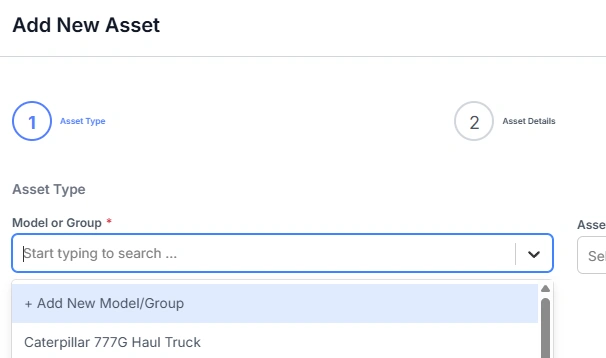
- Select a Model or Group.
Hundreds of models of construction and mining equipment have been loaded into Samurai and are available in this list. Try to find the asset model before adding a new one.
- If the Model or Group is not found in the list, a new one can be added by selecting Add New Model Group from the top of the drop down list
- Select an optional Image for the asset
- Click Next
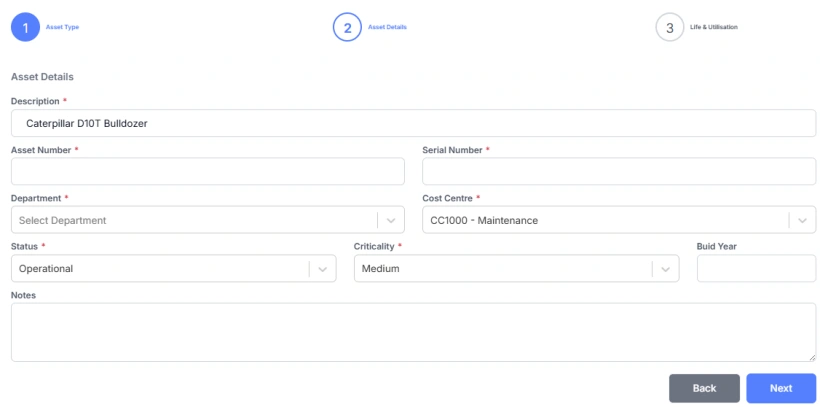
- Change the Description if neccesary
- Add an Asset Number and Serial Number if required
- Select the Site / Department. The Site/Department must exist before adding the Asset. If it's not in the list, you will need to add it.
- Select a Cost Centre
- Change the Status and Criticality if neccesary
- Add a optional Build Year
- Click Next
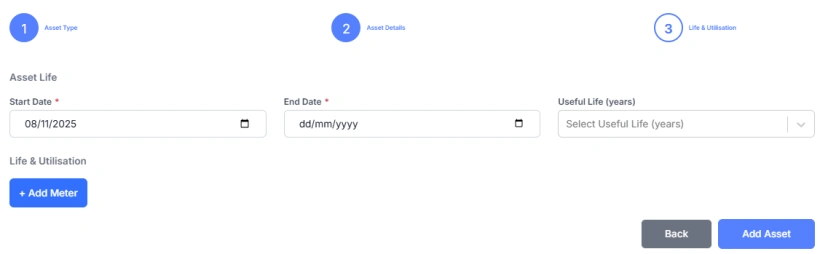
- Change the Start Date and set an End Date or Select a Useful Life (End date will be calculated)
- If the Asset Planning Type is Advanced or Standard, you can add the Asset Meter.
The Asset Meter is used to record usage for the Asset and the Utilisation per Year is used to forecast the Task occurences and future costs for the Asset.
- Choose an Asset Meter and enter the Start Reading and Utilisation per Year.
- Click Add Asset to complete the process.