
September 8, 2025
Release Notes
Date 8 September 2025
This update introduces a new Downtime Dashboard, improvements to Plant Hire workflows, Form enhancements and a range of quality improvements. These changes aim to improve visibility, streamline data entry and support better equipment management.
Downtime Dashboard
A new dashboard has been added to display live equipment downtime. Designed for workshop displays, it automatically refreshes and cycles through records.
- Shows all Events currently In Progress so teams can see active downtime at a glance.
- The number of assets shown per screen can be customised in settings.
- Refresh timing can also be adjusted to match operational needs.
- If more assets are down than fit on one screen, the dashboard cycles through pages automatically.
- Total and In Service asset counts are calculated automatically based on out of service equipment.
- Full screen display supported using F11 which is ideal for TV screens in workshops.
- Hire status displays when the Plant Hire module is enabled.
- A new endpoint provides summary stats for the dashboard.
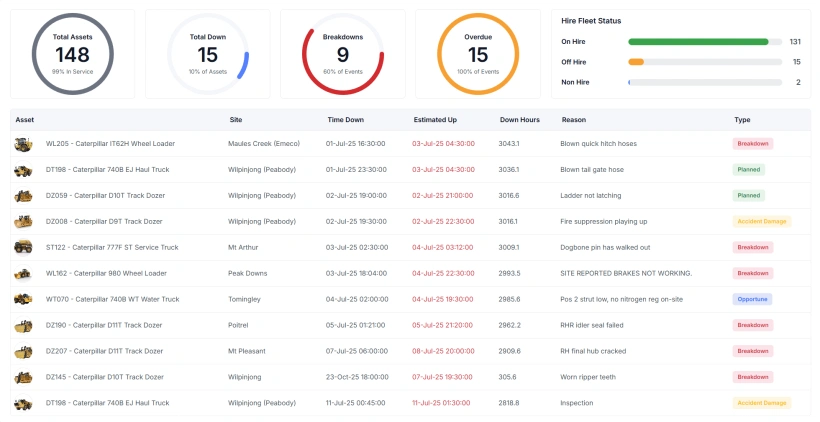
This dashboard provides visibility of live downtime, helping teams coordinate repairs and monitor fleet health in real time.
Plant Hire – Customer, Project and Department Link
The Projects table now links directly to Department. This improves how hire equipment is managed when assets move between work sites.
- Updating a project on an asset now automatically updates its Department.
- Multiple projects can link to one Department which supports locations with multiple customer jobs.
- This change reduces double entry and keeps asset location details consistent.
Asset Plant Hire Tab
Improvements have been made to the Plant Hire tab for assets. This tab appears only when the Plant Hire module is enabled and the asset is flagged as a Hire Asset.
- Hire status can now be set directly on the asset which is faster than using a form.
- Users must select a Customer first. Only projects linked to that customer are shown.
- Selecting a project automatically updates the asset’s Department based on the project’s assigned Department.
- Hire status is now displayed clearly on the Edit Asset form.
These changes make plant hire updates more intuitive and help maintain accurate location data.
Form Updates
- Photo form input can now require a minimum number of photos before a form can be completed. This ensures essential photo evidence is provided.
- When Photo is selected as the input type, the Allow Photos toggle is hidden to avoid duplicated options.
- Forms can now be started directly from the Desktop Forms Management page using the Start New Form button.
- Administrators can now delete In Progress forms if needed.
- Details and assignment fields are now combined into a single form with tabs for easier navigation.
- App settings have been moved under the Details tab to make them easier to locate.
- Added a loading spinner to the Export to PDF button so users know the system is working.
Notifications
- Added a Reject button for work requests with simplified button labels.
Weight UOM Setting
- Added a new setting for weight_uom which defines how weight units are displayed in the parts table.
- Weight UOM now appears in the parts table and on work orders.
Miscellaneous Improvements and Fixes
- Added validation to prevent duplicate part numbers and duplicate OEM Number plus Source of Supply combinations.
- New work orders now appear immediately in the panel and table after saving.
- New work requests also appear immediately without requiring a page refresh.
- Parts added to a work order now display immediately.
- Department dropdowns for work orders, assets and projects now show a hierarchy rather than a flat list which makes navigation clearer.