
Automatic Scheduling
Work Orders can be automatically scheduled directly from Asset Tasks. Each Asset Task can have a schedule that automatically creates a Work Order for the asset at regular intervals.
Setting Up Task Schedules
Task schedules are configured within the Asset record.
- Go to Assets & Areas → Assets
- Edit the desired Asset
- Open the Tasks tab
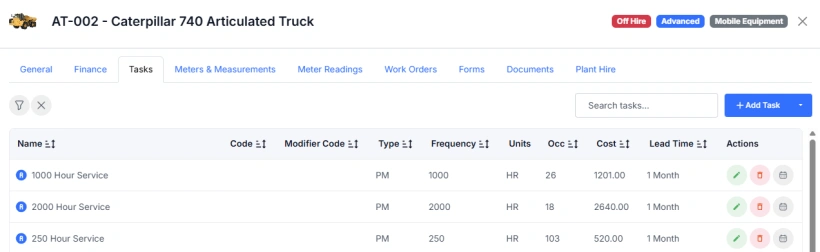
- Add or import one or more Tasks
- Edit a Task
- Open the Scheduling tab
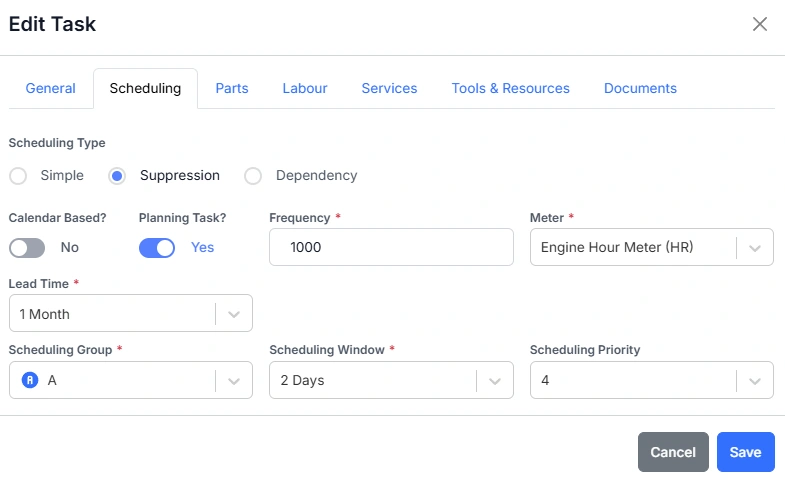
- Configure the Schedule settings as required
See Task Scheduling for information on setting up Task schedules.
Once saved, the system will automatically generate future Work Orders based on the schedule you define.
How Is This Different from Recurring Work Orders?
Recurring Work Orders are ideal for simple, time-based scheduling. For example, when you want a task to occur weekly or monthly on an asset or group of assets.
Task Schedules, on the other hand, offer much greater flexibility and control. They can:
- Be linked to asset meters, allowing scheduling based on equipment usage rather than fixed dates
- Support complex scheduling groups, including suppression logic
- Use hierarchies and dependencies to control task sequencing (for example, tasks A → B → C → A)
- Automatically suppress overlapping tasks within the same group based on defined rules
In short, Recurring Work Orders are best for simple date-based jobs, while Task Schedules are used for dynamic, usage-based, and interdependent maintenance planning.