
Recurring Work Orders
Recurring Work Orders are Work Orders that repeat on a regular schedule that you define. Any work order that is not based on a Task can be made into a recurring work order. Recurring work orders are useful for scheduling regular inspections and other repeating tasks for assets.
Setting Up a Recurring Work Order
- Go to Work Management → Work Orders
- In the panel view list, select the work order you want to make recurring
- In the top right of the Work Order, next to the Edit button, open the drop down options menu
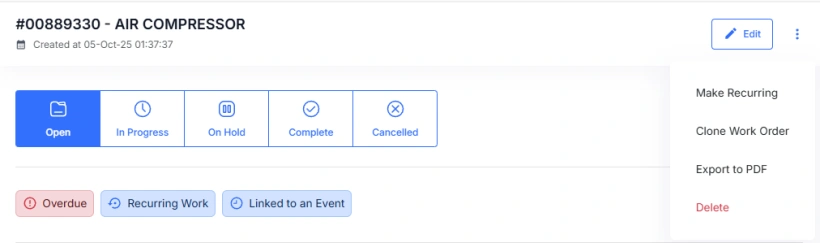
- In the Recurring Work Order form, select the required schedule and click Save.
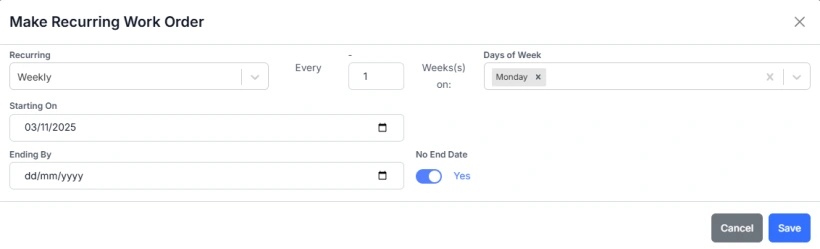
- The next 3 work orders in the recurring sequence will be generated.
- New recurring work orders will be generated up to the end date. If no end date is set, work orders will continue to be generated up to the end of the asset's life.
Editing a Recurring Work Order
- Go to Work Management → Work Orders
- Select a Recurring Work Order
- Click Edit in the top right to open the Work Order in edit mode
- Click Edit Recurring in the top right of the Work Order or go to the Schedule tab

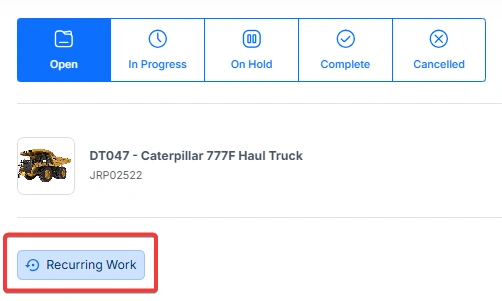
Recurring Work Orders are denoted by the Recurring Work tag.
Removing a Recurrence Schedule
- Go to Work Management → Work Orders
- Select a Recurring Work Order
- Click Edit in the top right to open the Work Order in edit mode
- Click Edit Recurring in the top right of the Work Order or go to the Schedule tab of the Work Order
- Toggle the Make Recurring switch off
- Any future Work Orders for that recurrence schedule that have not been modified will be removed
