
Scheduling Types
The Scheduling Type defines how the task behaves in relation to other tasks for the same asset.
| Type | Description |
|---|---|
| Simple | Generates Work Orders at fixed intervals (based on calendar days or meter readings). Each task runs independently, regardless of other tasks. |
| Suppression | Allows multiple related tasks to exist within the same scheduling group. When several tasks fall due around the same time, only the highest-priority task is generated, and lower-priority ones are automatically suppressed. |
| Cycle | Links tasks in a specific sequence so that one must be completed before the next is generated (for example, Task A → Task B → Task C). This is used for progressive or conditional workflows. |
How Suppression Works
Suppression helps keep your maintenance program tidy and efficient by avoiding duplicate or overlapping work.

When suppression is in use:
- All related tasks are placed in the same Scheduling Group, such as Group A.
- Each task in the group is given a Scheduling Priority, where 1 is the highest priority.
- Each Scheduling Group has a configurable Scheduling Window.
- Tasks continue to follow their usual frequency, such as every 10,000 hours.
- If two or more tasks within the group fall inside the Scheduling Window – such as within two days or similar usage – only the task with the highest priority will create a work order.
- Lower-priority tasks are automatically suppressed for that cycle – meaning they will not generate a work order and are also marked as completed when the higher-priority task is completed.
Example
Below is a simple structure:
| Task | Frequency | Scheduling Group | Priority | Hierarchy |
|---|---|---|---|---|
| Engine | 12,000 hours | ENG | 1 | Main component replacement |
| Turbocharger | 6,000 hours | ENG | 2 | Child component replacement |
In this case:
- Both tasks exist within the same Scheduling Group, in this case "ENG".
- The Engine task has the highest priority (value of 1) within the Scheduling Group and is due every 12,000 hours.
- The Turbocharger task is due every 6,000 hours and has a lower scheduling priority.
- When both tasks become due within the Scheduling Window (which a user could set to be within 90 days or 1,000 operating hours of each other):
- Only the highest priority task in the group will generate a work order – in this case, the Engine
- The Turbocharger task is suppressed by the Engine task
Completing the Engine task automatically also completes (resets the counter) for the Turbocharger task. Therefore, the turbochargers are due 6,000 hours (their task frequency) after the engine is replaced. In practice, replacing the engine also replaces the turbocharger as it is supplied with the new engine.
Benefits of Suppression
- Reduces duplicate work orders for related maintenance tasks
- Improves planning and scheduling efficiency
- Maintains each task’s normal frequency without changing task definitions
- Prevents double-counting of forecast costs for child tasks, improving accuracy of budgets, forecasts, and tender estimates
Limitations of Suppression
- Suppressed tasks do not generate individual work orders for that cycle
- Not suitable for tasks requiring independent execution or sign-off
- May reduce visibility of lower-priority tasks in short-term schedules
- Requires correct configuration of priorities and scheduling windows
When to use Suppression
- When the scope of one task encompasses the scope of another task
- Cost and resource forecasting accuracy is important for planning and tendering
When not to use Suppression
- Tasks that must always be performed and recorded independently, such as statutory, safety-critical and compliance tasks.
- Delaying or suppressing a task could introduce unacceptable risk
How Cycles Works
Cycle scheduling creates a repeatable sequence of tasks that run in a fixed order. Each time a task in the sequence is completed, Samurai automatically schedules the next task in the cycle. Once the final task is completed, the cycle returns to the start.
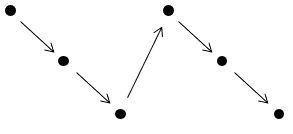
This approach is ideal when servicing follows a structured repeating pattern rather than a simple frequency.
Example 1
Hour Based Cycle
Tasks: 250 hour, 500 hour, 1000 hour, 2000 hour Interval between tasks: 250 hours
In this example, the servicing pattern repeats in a defined sequence. Instead of scheduling each task independently by its own frequency, the cycle ensures they trigger in the correct order.
The cycle runs as follows:
250 hour > 500 hour > 250 hour > 1000 hour > 250 hour > 500 hour > 250 hour > 2000 hour
Cycle returns to the start
With each work order completed, Samurai automatically advances to the next task in the sequence. This ensures the correct long term pattern of 250, 500, 1000 and 2000 hour services without overlap or duplication.
Example 2
Weekly Servicing Cycle
Tasks: 1 Week, 2 Week, 4 Week Interval between tasks: 1 week
Weekly servicing often follows a repeating rotation rather than simple multiples. Using a cycle allows you to define the exact order in which services occur.
1 Week > 2 Week > 1 Week > 4 Week
Cycle returns to the start
This pattern ensures the servicing program repeats in a predictable rhythm. Each time a service is completed, the next one in the cycle is scheduled automatically.
Benefits of Cycles
- Ensures tasks run in the correct long-term order without manual intervention
- Prevents missed, duplicated, or overlapping maintenance tasks
- Simplifies scheduling by managing multiple related tasks as a single sequence
- Automatically advances to the next task when a work order is completed
- Reduces administrative effort compared to managing individual task frequencies
- Ideal for maintenance programs with increasing or cumulative service intervals
Limitations of Cycles
- Tasks automatically follow a fixed order and require manual intervention to be rearranged
- Not suitable for tasks that need independent or irregular scheduling
- Changes to the cycle may affect future scheduled tasks
- Less flexible than standalone tasks for ad-hoc or reactive maintenance
- All tasks in the cycle share the same trigger
When to use Cycles
- When long-term maintenance patterns must be enforced automatically
- When tasks must occur in a specific repeating sequence
- To avoid managing multiple standalone tasks for the same asset
- When consistency and predictability are required
When not to use Cycles
- When tasks are unrelated or should run independently
- For condition-based or reactive maintenance activities
- When tasks require different trigger types
- If task order needs to change frequently
- For one-off or non-repeating maintenance tasks