
Linking a Work Order to an Asset Task
Work Orders for Standard and Advanced Assets can be linked to an Asset Task.
The Asset Task must already exist on the asset for it to be available for linking in the Work Order.
Linking a Work Order to an Asset Task
- Go to Work Management → Work Orders.
- Edit an existing Work Order or create a new one.
- Select the Asset (if creating a new Work Order).
- If the selected asset has tasks, the Task dropdown will automatically appear.
- If the Task dropdown is not visible, the asset does not have any tasks configured.
- Select a Task from the dropdown list.
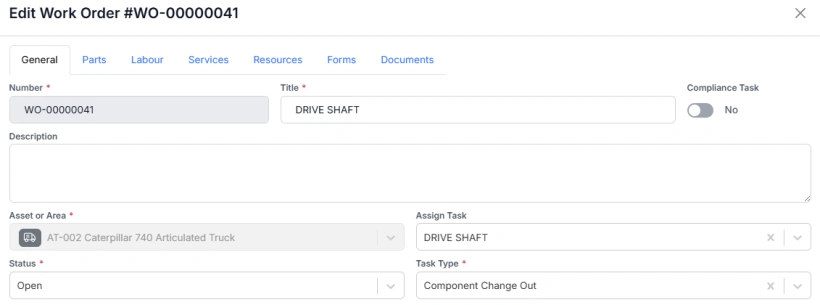
- When a task is selected, the Work Order will automatically:
- Update its title based on the task
- Match its Task Type to the selected task’s type
- Pull through the duration (if defined on the task)
- Copy any associated Parts, Labour, Services, and Resources from the task
The Work Order is now linked to the Asset Task.
Why Linking Matters
Linking Work Orders to Asset Tasks improves the quality and traceability of your maintenance data.
A Work Order often represents a trigger for a component changeout, so linking it to the corresponding task ensures that:
- Component changeout points are correctly recorded
- Component life histories are accurately built
- Task codes are associated with work orders for better failure and component analysis
Maintaining these links supports more accurate reporting and stronger maintenance insights across your organisation.