
Cost Centre
Cost Centres are used to group and allocate maintenance costs for reporting and analysis. They help organisations understand where costs are incurred across Assets, Tasks, and Work Orders.
How Cost Centres work
Cost Centres can be applied at multiple levels within Samurai CMMS. The system uses a clear inheritance hierarchy to determine which Cost Centre applies to each cost.
This means:
- Costs are always allocated at the individual line item level
- Each part, labour, or service line has its own Cost Centre
- Cost allocation is consistent across reporting and exports
Adding a Cost Centre to an Asset
- Go to Assets & Areas → Assets
- Click the edit button beside the Asset
- Only the General tab, select the Cost Centre
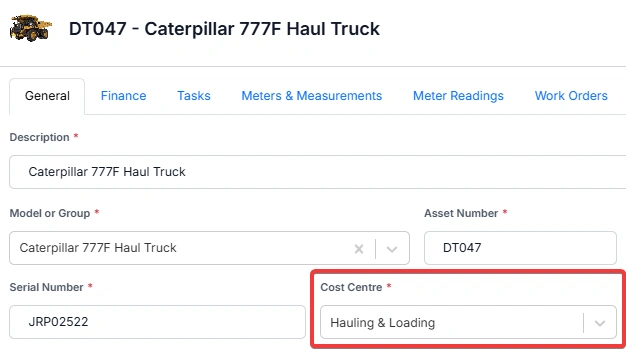
The Cost Centre must already exist before it can be added to an Asset. To create a Cost Centre, go to Reference Tables → Finance Tables → Cost Centres.
Cost allocation at the line item level
All maintenance costs are allocated at the line item level, not just at the Work Order level.
This applies to:
- Parts
- Labour
- Services
Each line item stores its own Cost Centre value. This allows accurate allocation even when a single Work Order contains costs for multiple Cost Centres.
Task-level cost allocation
Tasks can define default cost allocation for parts, labour, and services.
This works as follows:
- Each Task can assign Expense Codes at the group level for parts, labour, and services
- These group Expense Codes apply to all line items in that group by default
- The associated Cost Centre is inherited by the Work Order when it is generated
- Individual line items can override the Expense Code and Cost Centre if required
This ensures consistent cost allocation while allowing flexibility at the line level.
Expense Codes and Cost Centres
Expense Codes can have an optional default Cost Centre assigned to them.
When an Expense Code is used:
- The Expense Code Cost Centre overrides inherited Cost Centres
- The override applies only to the line items using that Expense Code
- Different line items on the same Work Order can use different Expense Codes and Cost Centres
Work Order Cost Centre inheritance
When a Work Order is created, Samurai CMMS determines the default Cost Centre using the following hierarchy:
| Priority | Source | Description |
|---|---|---|
| 1 | Manual Override | Cost Centre manually set on the Work Order or individual line item |
| 2 | Task | Cost Centre inherited from the Task configuration |
| 3 | Expense Code | Cost Centre derived from the selected Expense Code |
| 4 | Asset | Cost Centre inherited from the Asset record |
| 5 | WO Default | Default Cost Centre set in application settings |
| 6 | Fallback | System fallback Cost Centre when no other source is available |
Example scenarios
Task-based Work Order:
- A Task defines Expense Codes for parts with assigned Cost Centres
- A Work Order generated from the Task inherits these values
- Line items can be overridden if required
Ad-hoc Work Order:
- A Work Order is created without a Task
- Parts are added manually
- An Expense Code is selected for each part
- The Cost Centre automatically populates from the Expense Code if defined
- If no Expense Code Cost Centre exists, the inheritance hierarchy applies
Important considerations
- Changing a Task or Asset Cost Centre does not update existing Work Orders
- Consistent use of Expense Codes improves Cost Centre accuracy
- Line item overrides should be used carefully to maintain reporting integrity
This structure provides accurate, flexible, and auditable cost allocation across all maintenance activities.