
Plant Rate Book
Open Plant Rate Book in Samurai
The Plant Rate Book holds reusable hire rates by Model / Group. A Project can also have its own Plant Rates. The book is the starting point for selecting quoted equipment and for choosing an appropriate rate on an Asset assignment.
Find a rate
- From Plant Management, open Plant Rate Book.
- Search or filter by Model/Group, Asset Class, Rate Basis, Plant Rate Type, or minimum basis.
- Use the row's edit pencil to review an existing rate. Select Add Plant Rate when a separate rate variant is needed. Creating or changing rates requires the appropriate access.
A generated $0 placeholder means the rate needs review and completion; it is not evidence that the hire agreement has been priced. A genuinely agreed zero rate can be retained deliberately.
Maintain rate details
- Confirm Model / Group, Name, Currency, Rate Basis, and Rate Type.
- For a Simple rate, enter the agreed Plant Rate. For a Calculated rate, review its costing inputs and resulting rate rather than treating a costing model as an agreed fixed price.
- Review the measurement units and expected utilisation where applicable.
- For hourly rates, select the appropriate minimum basis and enter its minimum hours or amount. Daily and Weekly rates do not use the hourly monthly-minimum options.
- For a Daily rate, confirm the chargeable weekdays. These determine which dates in the hire window contribute to its daily charge.
- Check External Account if the charges will be sent to Xero. Record relevant Notes and select Save.
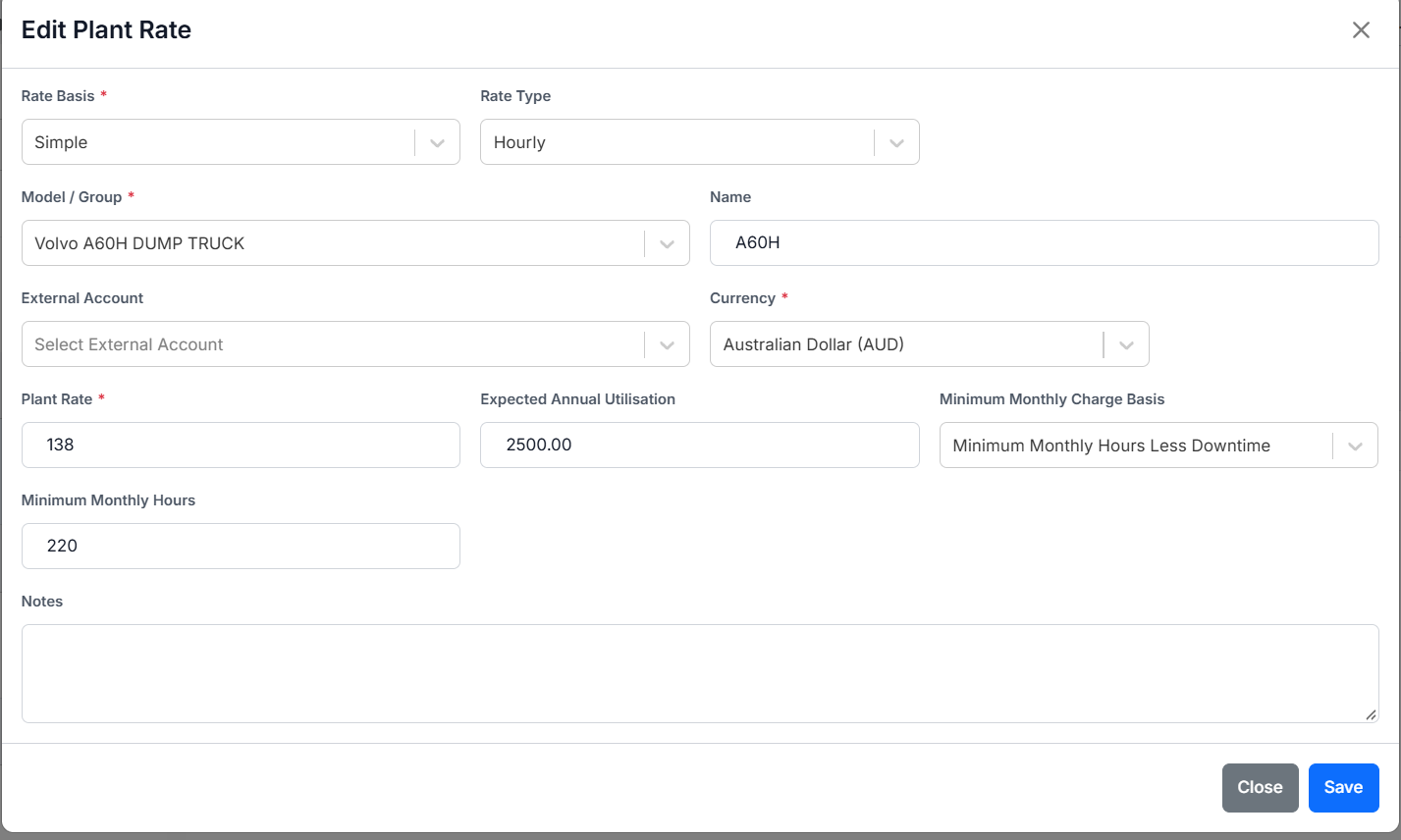
This training capture illustrates an hourly rate and a Less Downtime minimum. Use the actual agreement's values.
Use book and project rates
The Asset Assignment rate selector identifies Book Rate and Project Rate options for the Asset's Model/Group. A Project rate with the same Model/Group and name takes precedence over the matching book option in that selector. Check the displayed source and price before saving the assignment.
Use Plant Rates in Samurai for Project costing/rate maintenance. For the existing costing reference, see Plant Rates help and its Categories.
Before billing
A rate-book entry does not by itself place an Asset on hire. Check the quote, dated Asset assignment, and agreed price. Represent changes of price or Project during a hire with distinct dated assignments; editing one rate in place does not create an effective-dated history.
After changing a rate used by saved draft invoices, recalculate the billing run and review the resulting amounts and retained overrides.