
Plant Invoicing
Open Plant Hire Invoicing in Samurai
From the side menu, select Plant Management → Invoicing. The page heading is Plant Rate Invoicing.
A billing run brings together invoices for a selected billing start month and year. Customers can have different billing start days, so one run can contain different customer date ranges. Invoices group the saved customer/project charges; each Asset row represents a particular hire assignment and charge window. One Asset can appear in more than one row.
The workflow
- Prepare Customers and Projects.
- Check rates, quotes and Asset assignments.
- Choose the billing period and calculate drafts.
- Review the run and readings, including missing assignments and exclusions.
- Check charges and minimums, then correct or override drafts.
- Commit reviewed invoices.
- Print invoices or send them to Xero and arrange customer delivery.
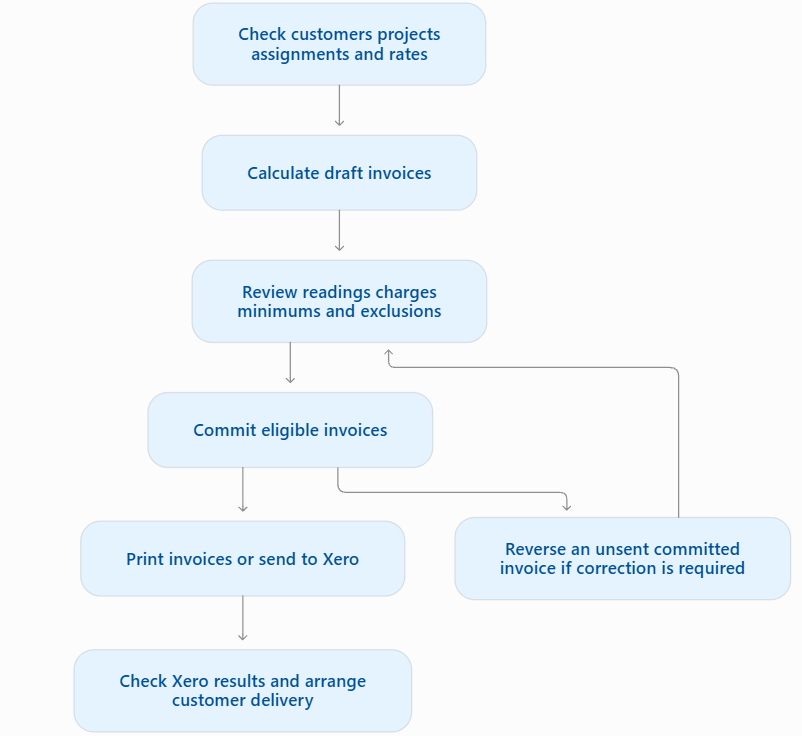
Calculate, Commit, and Send to Xero are separate actions. Calculating creates drafts; committing locks charges; sending creates the accounting invoice. Opening a screen or printing a draft does not perform the later actions.
Review filters do not restrict the whole-run Commit Invoices or Send to Xero actions. Read their confirmations before proceeding.
Start with Before you start, or use the month-end checklist and troubleshooting.